IMPROVE RETENTION - HIRE CONFIDENCE!
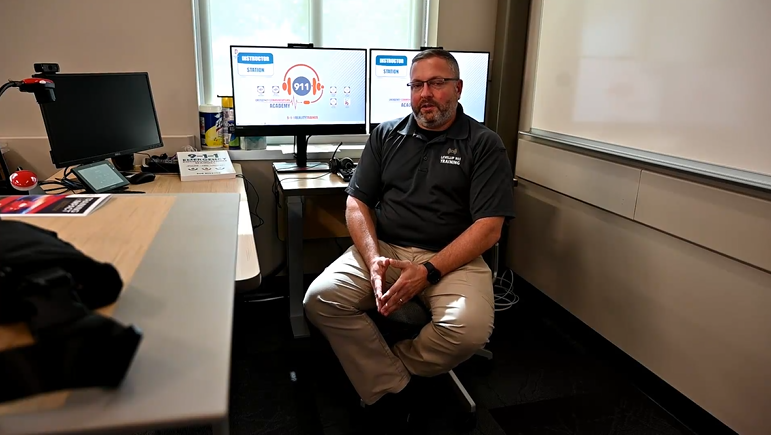
“So we’ve utilized this system with thousands of students to test their knowledge and abilities and to see if they can graduate to become a 911 Telecommunicator.
It’s a very good system, it’s a very good process, and it’s something that we’ve used for years to test actual skills multi-tasking, handling multiple phones, and heavy radio traffic.” Jason Long, KY State Police Academy LevelUp 9-1-1 Training. Check Out 9-1-1 Reality Simulators.

Find your career tech high school or college partner by entering your zip code above.

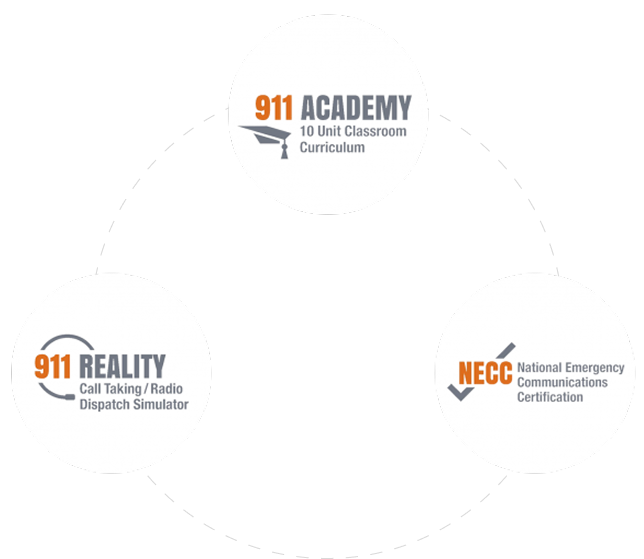
The 9-1-1 Online Academy is ten units of study created in a DACUM process by an advisory 9-1-1 board. In the Academy, each student answers 50 police, fire or EMS callers for call taking practice and evaluations. Student then move to 9-1-1 Reality Simulators for learning multi-tasking phone, radio, text – under pressure. Scroll down to learn how to increase retention like Lake County 9-1-1.
9-1-1 + School Collaborations

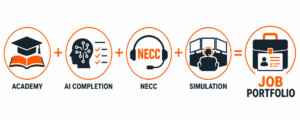
 Lake County Ohio was weary of turnover, overtime and burned out 9-1-1 trainers. They reached out to Auburn Career Center and Professional Pride, Inc. for help. Working together, our team created a pipeline course to train 9-1-1 Telecommunicators. Students go through an extensive 9-1-1 Academy and NECC Certification. They move to 9-1-1 Reality Simulators – taking calls, dispatching and multi-tasking. Lake County receives ‘student portfolios’ of their scores and audio of call taking. Let’s work together for your Comm Center collaboration.
 IT has questions!! Whether you’re exploring how our simulators integrate with your systems or wondering about setup and security, we’ve got the answers. Our goal? Make sure you’re fully informed, comfortable, and ready to let your trainees practice the skills needed before the console. Also know that schools have a PERKINS grant for new equipment so collaborate today.
Still Have Questions? Let’s Talk!
Is 911 Reality an 'appliance' and what does that mean?
- Pre-configured
- Purpose-built for a specific function
- Not intended to be modified much by the end user
- “Plug-and-play” from the operator’s perspective
A computer that behaves like a tool ensuring safety and security.
- The simulator is delivered as a complete, self-contained system
- It runs a specific application (911 simulation) without needing custom setup
- Users (trainers/teachers) don’t manage the underlying OS, configs, etc.
- It’s treated operationally like equipment, not IT infrastructure
|
Type
|
Description
|
|---|---|
|
General computer system
|
Flexible, user-managed (install apps, configure, troubleshoot)
|
|
Appliance
|
Locked-down, purpose-built, minimal user intervention
|
Can we use our own computers and just load the software?
No – short answer. The 9-1-1 Reality Simulator software is customized, configured and thoroughly tested prior to delivery. Imagine the Windows and Network settings needed to allow the complex system of multiple phone lines, multiple radio channels, recording studio, sound effects, text to 9-1-1 and the list goes on. We also use the latest state of the art equipment with the exact requirements we need.
Can the stations work with our CAD program?
Common question. A coalition of 9-1-1 professional trainers and educators designed the CAD card on the simulator. We recognized there are many CAD systems, yet we created an entry common muscle memory using a ‘training CAD’. Using this simplified CAD card does wonders introducing and understanding a more complex CAD system.
Can we use our own headsets for the stations?
Sure. Our headsets are pretty amazing though.
What does the warranty cover?
The warranty is for the equipment; computer, monitors and accessories. The software is warranted for the life of the computer.
Is there a yearly fee for upkeep and do I have to pay for upgrades?
No fees at all, you own this great hard working reliable training tool. We have systems still working for the last fifteen years. If we have a required ‘update’, such as some nasty change in Windows, we can work on your station remote. If we have a significant ‘upgrade’, we will offer this to you for minimal cost. Upgrades are never required.
Can we purchase the simulator using our own monitors or headsets?
Customer-supplied displays, audio devices, or other hardware are not included in the supported system configuration and are not covered under warranty. Customers may elect to connect additional peripheral equipment after installation; however, the performance, compatibility, and supportability of third-party hardware remain the responsibility of the customer and may not be covered under our technical support or warranty programs. While customers are free to connect additional displays, headsets, or other peripheral devices after installation, our warranty and technical support apply only to the simulator as originally configured and delivered. We cannot guarantee the performance or compatibility of customer-supplied hardware.
















COLLABORATE WITH EDUCATION